




Here WeGo isn’t just another map app. It’s a navigation engine built for people who actually need to get from point A to point B without burning through their data plan or getting lost in a city they’ve never visited. The interface is clean. The logic is straightforward. And unlike some of the louder competitors, it doesn’t scream for your attention until you’re already lost.
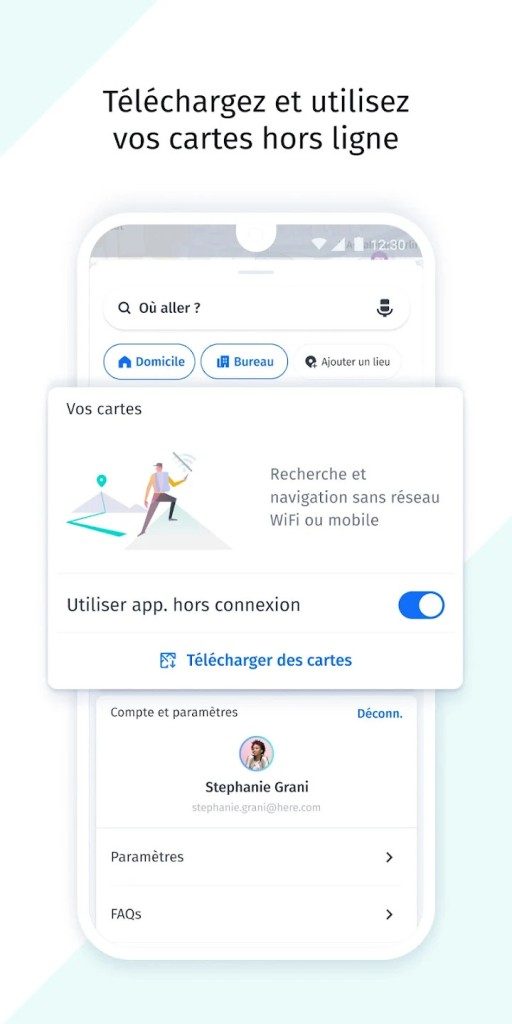
The core appeal? Here WeGo offline navigation. You can download entire city maps directly to your device. No signal? No problem. This is huge for travelers. It’s also great for anyone who hates watching their mobile data meter tick up while driving. The app handles walking, cycling, driving, and public transit with a level of precision that feels less like guesswork and more like local knowledge.
“Here WeGo positions itself as a reliable alternative to the giants of mobile mapping by focusing on utility over clutter.”
Why Choose Here WeGo for Multi-Modal Travel?
Most navigation apps treat public transit as an afterthought. Here WeGo integrates it into the primary route planning. You can plan trips that mix driving, walking, and buses without jumping between different apps. It suggests the fastest route based on real-time traffic, but it also knows where the traffic lights are.
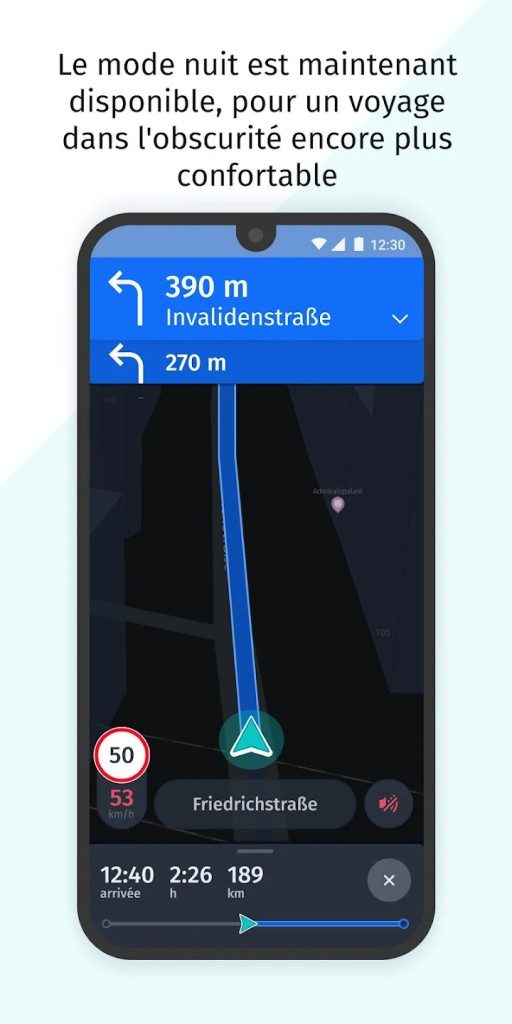
For drivers, the app adapts suggestions based on current traffic conditions and even indicates nearby parking spots. For eco-conscious commuters, it offers optimized paths for cycling and walking. The database is rich with points of interest—gas stations, hotels, restaurants—plotted along your path so you aren’t scouting for fuel mid-turn.
The versatility is the selling point. It works for the daily commuter stuck in gridlock and the tourist planning a weekend in Tokyo. The mapping data is updated regularly, covering vast territories with surprising accuracy.
Where to Get Here WeGo and How to Install It
You don’t need a tech degree to install this. If you have a smartphone, you’re covered.
On Android, it’s on the Google Play Store. On iOS, it’s in the App Store. The process is standard: download, open, grant location permissions, and go. The app doesn’t hog your storage. Even with offline maps downloaded, it stays lean.
But what if you’re on a Windows PC or a Linux machine? There is no native desktop app. That’s not a bug; it’s a design choice. Instead, Here WeGo offers a fully functional web version. You can access it through any browser on their official site. It’s not just a skeleton of the mobile app. It has the same routing logic and map rendering. This multi-platform approach means your travel plans aren’t locked to a single device.
Keeping Your Maps Updated and Synced
Neglecting updates is the fastest way to get bad data. The app recommends keeping it current for security patches and map corrections. You can automate this in your device settings or do it manually from the store page. Manual control is often better—it lets you time the download when you have Wi-Fi.
If you use multiple devices, Here WeGo uses a Here account to sync your favorites, saved routes, and preferences. Change from your phone to your laptop? The context follows you. The experience remains consistent.
The Offline Advantage: A Deep Dive
Let’s talk about why Here WeGo offline maps matter beyond just saving data.
When you’re in a remote area, or simply in a basement with spotty reception, GPS still works (it uses satellites, not cell towers). But without internet, you can’t load a new map tile. Here WeGo solves this by letting you pre-download regions. You pick the country or city. You wait for the download. Then you’re locked in.
This feature is critical for international travel. Roaming fees are expensive. Data speeds vary wildly. Having a static, pre-loaded map ensures you always know where the next turn is, regardless of network quality. It’s a small feature that prevents big problems.
Compatibility and System Requirements
Here WeGo supports recent versions of Android and iOS. It won’t run on ancient hardware, but it doesn’t need flagship specs either. It runs smoothly on mid-range devices.
For Windows, macOS, and Linux users, the web interface is the only way in. There are no native installers. This keeps the desktop experience lightweight but functional. If you need advanced features like detailed transit schedules or complex multi-stop routing, the web version holds up well.
Synchronizing data between mobile and web requires a Here account. It’s free. It links your saved locations so you can start planning on your laptop and switch to your phone when you step out the door.
The app doesn’t promise to be the most glamorous navigation tool. It promises to be reliable. For many users, that’s the only feature that counts.
Most navigation apps are just data sinks. They want your location, your habits, and your attention. Here WeGo is different. It doesn’t sell you out. The app is built for privacy first. It doesn’t track your movements for ad targeting. This matters if you care about digital hygiene. It also matters if you just hate spam.
The real win here is offline capability. Google Maps requires a constant data connection for its best features. Waze needs live traffic data to function. Here WeGo lets you download massive map packs before you leave. You can navigate without a signal. This is huge for international travel. Or anywhere with spotty coverage. Rural Europe, mountain passes, remote areas. You download the map once. Then you are free.
Privacy and Offline Data Control
Here WeGo focuses on data protection. Most competitors track everything. They sell insights to advertisers. Here WeGo keeps your data local. Your route history stays on your device. You don’t create a cloud profile by using it. This approach appeals to users who value anonymity. It also reduces data usage. If you are on a limited mobile plan, this is a saving.
The offline maps are not just basic outlines. They are detailed. Especially in Europe. The cartography is surprisingly accurate. You get street names, highway exits, and POIs. It works without internet. You can plan a trip offline. Then execute it offline. No buffering. No errors. Just directions.
Multimodal Navigation: Beyond the Car
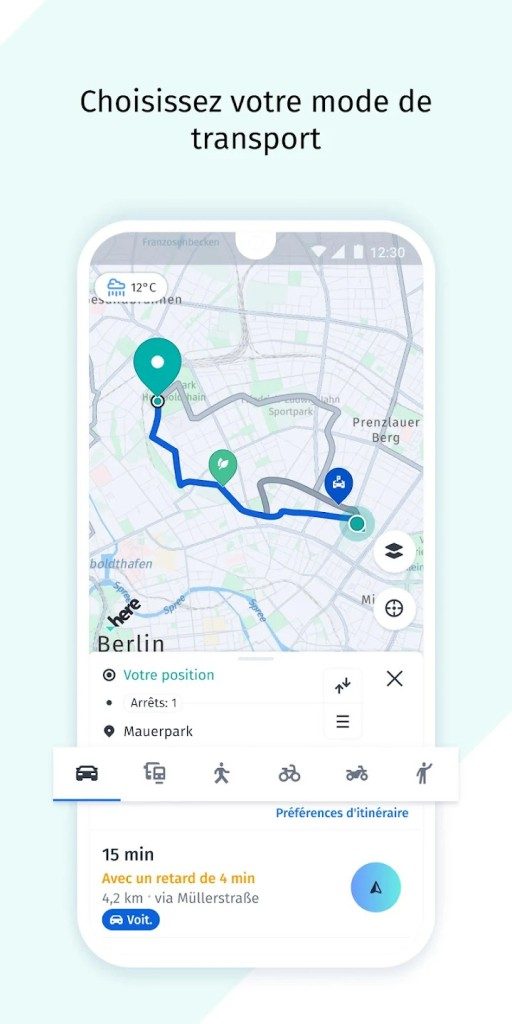
Waze is a traffic app for drivers. It’s community-driven. Real-time reports from other drivers. Speed traps. Accidents. It’s great for commuting. But it’s limited. Here WeGo covers more than just cars. It includes walking, cycling, and public transit. This makes it a true multimodal tool.
Consider urban travel. You might take a bus to a train station. Then walk to your hotel. Here WeGo plans this. It shows bus schedules. It maps subway lines. It includes tram routes. It handles connections. You get door-to-door directions. Not just point A to point B by car. This is useful for tourists. It’s useful for city dwellers who don’t drive. It respects the complexity of modern transit.
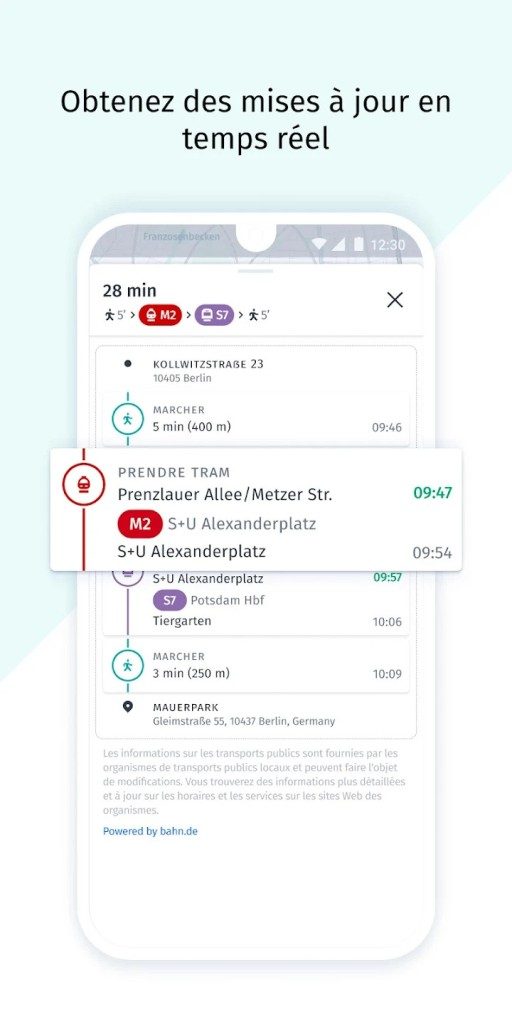
The app integrates schedules. It checks for delays. It reroutes if a bus is late. This isn’t just pretty graphics. It’s functional data. You can rely on it. Especially in cities with complex networks. Berlin, Paris, London. The data is solid. You can navigate like a local. Without speaking the language.
Cost and Accessibility
Here WeGo is free. Completely. No premium tier. No subscriptions. No “pro” version. Other apps lock offline maps behind a paywall. Or limit features for free users. Here WeGo gives you everything. All maps. All features. No strings attached. This is rare. Most big tech companies monetize every click. Here WeGo doesn’t.
The developer doesn’t charge for updates. They don’t charge for new features. The cost is covered by ads. But the core experience is ad-free in terms of forced upsells. You don’t need a student discount. You don’t need a business license. It’s open to everyone. This drives adoption. Travelers love it. Commuters appreciate it. Privacy advocates endorse it.
There are no hidden fees. No in-app purchases for basic navigation. This simplicity is refreshing. You download it. You use it. You don’t worry about costs. This matters for long trips. Data roaming fees are expensive. Offline maps save you money. Here WeGo adds to those savings. It removes the barrier to entry.
Updates and Stability
Maps need updates. Roads change. New buildings go up. Old ones come down. Here WeGo pushes regular updates. You get notified when a new map is ready. You update via the app store. Or reload the web version. The process is straightforward.
Sometimes, an update breaks things. This happens with all software. If a new version is buggy, you might want to go back. You can find older versions. They are available as installation files. But the developer doesn’t recommend this. It’s a security risk. Older versions might have vulnerabilities. They might not have the latest bug fixes. Use caution. Stick to the latest stable release unless you have to.
Learning Curve and Resources
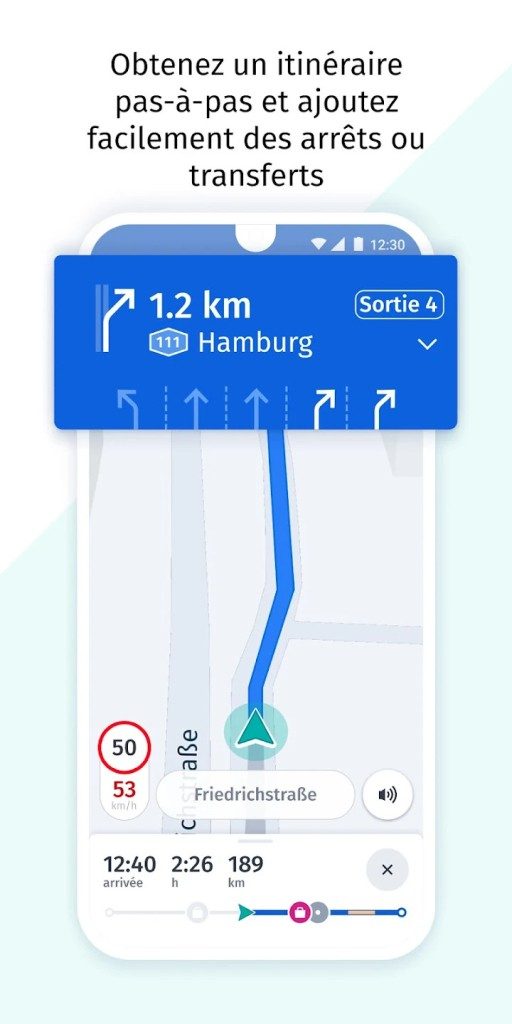
You don’t need a manual. The interface is intuitive. It looks like other apps. It behaves like you expect. Start point. End point. Go. That’s it. For basic use, it’s foolproof.
But there are hidden features. You might miss them. Third-party integrations. Custom route exports. Favorite locations. Advanced filtering. If you want to master the app, look for tutorials. There are guides online. Videos. Step-by-step articles. They are free. They help you optimize your workflow. You can save complex routes. You can share them. You can customize the display.
There is no official certification. You don’t need a license to use it. It’s for everyone. But professionals are starting to notice. Logistics companies. Tourism boards. Transport agencies. They use it for planning. This might lead to formal training later. For now, it’s self-taught. The community fills the gaps.
The Bottom Line
Here WeGo is a solid choice. It’s not the flashiest app. It doesn’t have the biggest user base. But it has substance. It respects your privacy. It works offline. It covers multiple transport modes. It’s free.
For travelers, it’s essential. You can navigate without data. You can explore off the beaten path. You can rely on accurate maps. For city dwellers, it’s useful. You can plan multimodal trips. You can save money on transport. You can avoid driving.
The app doesn’t promise perfection. It promises reliability. It works. It doesn’t try to sell you anything. It just helps you get from A to B. In a world of surveillance capitalism, that’s worth something.
Will it replace Google Maps for everyone? Probably not. Google is too entrenched. Waze is too addictive for traffic. But for specific needs, Here WeGo wins. Privacy. Offline access. Multimodal planning. Free cost. It’s a niche player. But a powerful one.
The market is shifting. People are waking up to data tracking. They want control. Here WeGo offers that. It’s not just a tool. It’s a statement. You can navigate without being watched. You can travel without spending data. You can plan without paying.
It’s a quiet revolution. Small steps. Big impact. The app keeps improving. New features roll out. The community grows. The future looks open. Whether you’re a casual user or a logistics pro, it’s worth trying. You might just find that less is more. And that’s a good thing.
Why offline navigation still matters for travelers
Most people assume GPS requires a constant data stream. Here WeGo disproves that. The app leans heavily on local storage for its maps. You download the region before you go. The phone holds the data. The app guides you without touching the cellular network.
This matters. Roaming fees are expensive. Dead zones exist. The feature is solid for any trip where signal drops out.
HERE Technologies built the underlying map infrastructure. It is not a startup guessing at street layouts. The engine is mature. The experience stays consistent whether you are on mobile or the web. Syncing favorites and collections happens through a HERE account. You start planning on a laptop and finish on a phone. The handoff is smooth.
How the offline feature actually works
The core mechanic is simple. You select countries or regions. The app downloads the vector data. It stores it locally. Navigation, voice guidance, and time estimates rely on this cache. You do not need a connection.
There are limits. You cannot search for new places online. Traffic updates require a live link. Map updates also need internet access. The storage footprint varies. Picking a whole country takes more space than a single city. It is a trade-off. Space for independence.
Platform support and privacy controls
Here WeGo covers Android and iOS. It also runs in modern browsers. A smartphone with GPS provides the best location accuracy. A computer is fine for planning routes and managing lists. The web interface does not track your position in real-time. That is a privacy win.
Users control location sharing. You can toggle history sharing. The settings are clear. This is not a black box. You decide what leaves your device.
Key technical specifications
- Name: Here WeGo
- Publisher: HERE Global B.V.
- License: Free
- Model: No mandatory subscription
- Platforms: Android, iOS, Web Browser
- Distribution: Google Play, Apple App Store, Official Website
- Category: Travel
- Interface: Multilingual (French included)
- Navigation Modes: Car, Walking, Cycling, Public Transit
- Major Features: Offline maps, Route calculation, Voice guidance, Real-time traffic, POIs, Favorites/Collections
- Internet Required: Yes for search, traffic, updates. No for offline navigation with downloaded maps.
- Offline Data: Download by country/region. Local storage.
- Syncing: Favorites and preferences via HERE account across mobile and web.
- Hardware: Mobile device with GPS recommended. Computer for web use.
- Storage Space: Variable based on downloaded map size/count.
- Privacy: Controls for location sharing and history.
- Support: Online help center and documentation.
Is it the right choice?
It depends on your needs. If you want a free solution that works without a network, this is a strong option. It handles multiple modes of transport. Walking routes are clear. Driving directions are standard. Public transit info is included where available.
The interface is clean. The functions are direct. It does not clutter your screen with ads or social feeds. It just shows the way. For many users, that simplicity is the main selling point.
The limitations you should know
Offline mode has boundaries. You cannot get live traffic updates without a connection. You cannot find a new coffee shop that opened yesterday if you have no signal. You must plan ahead.
The map data is good but not always cutting-edge. HERE has been around for a while. They are reliable. They are not the fastest to update every minor street change. For major roads and well-mapped cities, it is fine. For obscure alleyways, you might need to double-check.
How to maximize the experience
Download maps while on Wi-Fi. Size matters. If you are going to a rural area, download the entire region. If you are in a big city, the city download is enough. Clear out old maps if space is tight. The app does not always auto-delete unused data.
Use the account sync feature. It saves time. You can plan a route on the web at home. The favorites will appear on your phone. No manual entry.
Privacy settings are key. Turn off history sharing if you do not want a trail of your movements. The app respects that choice. It is not aggressive about tracking.
Final thoughts
Here WeGo is not trying to be everything to everyone. It is a navigation tool. It does its job well. The offline capability is its strongest suit. The web integration adds flexibility. The privacy controls add trust.
It is not perfect. The map updates are not instant. The interface is functional, not flashy. But for

The Hidden Costs of “Free” Open Source
You signed the agreement. You clicked “I Agree.” Now you’re responsible.
Most people think open source is free because the price tag is zero. It isn’t. The cost has just shifted. You pay in time. You pay in security patches. You pay in the anxiety of wondering if that library you pulled from GitHub three years ago has been abandoned.
This is the trade-off for control. When you use proprietary software, the vendor owns the problem. When you use open source, you own the solution. And often, the solution is a patch you have to write yourself.
Security Patches and Supply Chain Attacks
The 2023 log4j vulnerability didn’t just break servers. It exposed a fundamental weakness in how we build software. Developers rely on third-party components. Those components are maintained by volunteers, small teams, or corporations with different priorities.
When a flaw is found, who fixes it?
In a commercial ecosystem, you wait. You wait for the vendor to release a patch. You wait for IT to approve the update. You wait. In open source, you fork. You patch. You test. You deploy.
This isn’t just about code. It’s about trust.
A supply chain attack happens when the tool you use to build your product is compromised. The 2021 SolarWinds hack didn’t happen through a weak password. It happened through a trusted update channel. Open source projects face the same risk. The maintainer’s account gets hacked. The malicious code gets merged. Your download includes a backdoor.
Which libraries do you trust?
You can’t trust blindly. You have to audit. You have to verify checksums. You have to monitor for unmaintained dependencies. This is the daily grind of modern IT. It’s not glamorous. It’s not marketing-friendly. It’s just survival.
Performance and Customization
Commercial software comes with features you didn’t ask for. And features you didn’t see coming.
Open source lets you strip away the bloat. Need a lightweight database? Pick one that does exactly what you need. Want a web server that handles ten thousand concurrent connections with low memory? Configure it to your taste.
This matters for cost. Not just licensing costs. Compute costs.
Running a lean stack on cloud infrastructure saves money. Every unnecessary process eats CPU cycles. Every unused feature adds complexity. Complexity breeds bugs. Bugs cause downtime. Downtime costs money.
The flexibility to optimize at the code level is a tangible asset. It’s not abstract. It shows up in your infrastructure bill.
The Community Factor
Support forums are hit or miss.
Commercial support guarantees a response time. Open source support relies on goodwill. But that goodwill is massive.
Stack Overflow. GitHub issues. Discord channels. Reddit threads.
When you hit a wall, you’re not alone. You’re part of a global network of developers who have likely seen your error before. The collective intelligence is hard to replicate.
But it’s not always helpful.
Sometimes the advice is outdated. Sometimes the maintainer is silent. Sometimes the community is toxic. You have to navigate it. You have to contribute back. If you fix a bug, submit a pull request. If you write a guide, share it. The ecosystem thrives on reciprocity.