


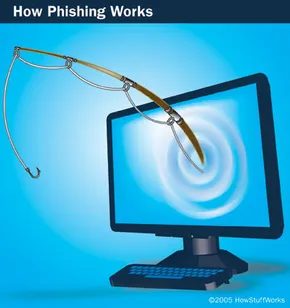
You open your inbox. The subject line is urgent. It claims to be from your bank. They say your account is locked. If you don’t click the link and log in right now, you lose everything.
Your heart skips a beat. That panic? That’s the hook.
This is phishing, a digital con job designed to steal your life. It isn’t just about losing a few hundred dollars. It’s about identity theft. It’s about letting strangers drain your accounts, make purchases in your name, or even use your computer for money laundering without you knowing.
Most people think of phishing as a nasty email pretending to be Amazon or a credit card company. And sure, that’s the most common face of the beast. But the email is just the lure. The trap is much deeper.
The Anatomy of a Digital Con
Phishing isn’t magic. It’s a process. A cold, calculated cycle that has evolved since the word first appeared in 1996. The term itself is a pun on “fishing,” implying that criminals are casting nets to see what information they can catch.
Here is how the machinery actually works.
Planning. The attackers decide who to target. They don’t just guess. They use the same data-harvesting techniques as spammers. They scrape addresses. They buy lists. They identify the customer base of a specific bank or retailer.
Setup. Once the targets are picked, the infrastructure goes up. They create a spoofed email address that looks legitimate. They build a fake website. This site mirrors the real one so perfectly that even a trained eye might hesitate.
The Attack. The message lands in your inbox. It uses psychological pressure. It creates urgency. It threatens immediate loss. It demands immediate action.
Collection. You click. You type your password. You enter your Social Security number. The data flows into the attacker’s database.
The Aftermath. This is where the real damage happens. The thieves use your credentials to make illegal purchases. They commit fraud. And here is the scary part: studies suggest that up to 25% of victims never fully recover from the financial and emotional fallout.
Why Your Security Software Can’t Save You
We rely on firewalls and antivirus software to keep us safe. But phishing doesn’t just hack your computer. It hacks you.
It exploits weaknesses in both client-side software and server-side security. But at its core, it is an old-fashioned hustle. It relies on trust. It relies on the assumption that an email from “support@yourbank.com” is actually from your bank.
The criminals know that most people are rushed. They know you are tired. They know you will click the link because the threat feels real.
Spotting the Red Flags
So, how do you protect yourself? You have to be skeptical.
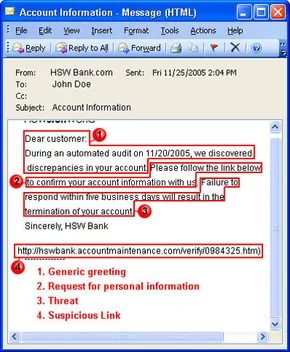
Be wary of generic greetings. “Dear Customer” is a dead giveaway. Real banks usually know your name.
Watch out for threats. Legitimate institutions will tell you there is an issue. They will ask you to log in to a secure portal to resolve it. They will not demand immediate action via email.
If an email asks you to verify your password, delete it. Never provide personal information through a link in an email.
Report it. If you suspect an attempt, report it to the appropriate authorities. Your bank’s fraud department is usually a good start.
The Cycle Continues
Phishers are not static. After an attack, they evaluate what worked. They tweak their messages. They refine their fake websites. They start the cycle again.
The first documented use of “phishing” was nearly three decades ago. The tactics have changed, but the goal remains the same: to fish for your information.
Are you still checking your email with that same sense of urgency?
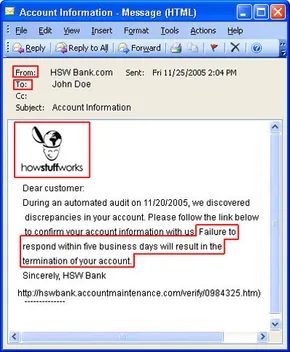

You wouldn’t hand your bank details to a stranger. Most people know better. Yet phishers don’t ask. They steal. To get those credentials, they have to work around human psychology. This is social engineering. It’s not about hacking code. It’s about hacking trust.
Scammers replicate familiar branding. They copy legitimate emails exactly. Then they swap out the links. The victim clicks a button that looks official. It leads to a fraudulent page. The email address in the “From:” field is spoofed. It looks real. The “Reply-to” address is fake. The links are obfuscated. They hide the true destination. But copying the look is only half the battle.
The real trick is urgency. Phishing messages demand immediate action. They want you to react before you think.
“Act now or lose everything.”
That’s the message. Some threats promise account cancellation. Others claim you made a purchase you didn’t. You panic. You don’t want to lose money for a transaction you never completed. So you click. You follow the link. You give up the very information you were afraid they had.
Trust in automation plays a huge role here. People believe computers are objective. They think algorithms don’t make mistakes. Phishers exploit this blind spot.
Messages often claim a “computerized audit” found anomalies. They say an automated process detected suspicious activity. The victim believes someone is hacking their account. They don’t believe the system made an error. It’s easier to imagine a thief than a glitch.
Phishing isn’t just email anymore. Scammers cast a wider net.
- Instant messages
- Cell phone texts (SMS)
- Chat rooms
- Fake banner ads
- Message boards and mailing lists
- Fake job search sites
- Fake browser toolbars
The medium changes. The goal stays the same.
Why Complex Software Makes Phishing Easier
There is a direct correlation between software complexity and security vulnerabilities. The more features a web browser or email client has, the more opportunities attackers have to slip through the cracks. As security filters improve, phishing tactics evolve to bypass them. It’s an arms race, and the tools users rely on daily often provide the loopholes.
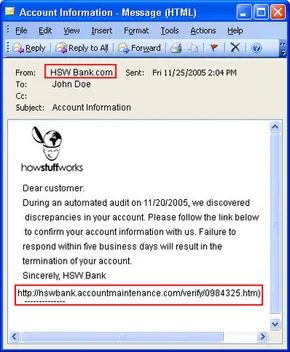
The most prevalent method remains address spoofing. Most email clients let users type whatever they want into the “From” and “Reply-to” fields. This convenience is useful for people managing multiple identities, but it’s a goldmine for fraudsters. They can craft messages that appear to originate from trusted sources. Some email servers compound this risk by allowing connections to the Simple Mail Transfer Protocol (SMTP) port without authentication. This lets attackers bypass personal passwords entirely, instructing the server to send malicious messages directly.
Beyond fake senders, attackers use several technical tricks to deceive users and evade detection.
Deceptive Links and Hidden Code
Obfuscated URLs are a primary vector. These links look legitimate but redirect users to malicious sites. Attackers use several techniques to achieve this:
- Typosquatting and IDNs: They might misspell a company’s URL or use International Domain Name (IDN) registrations. This allows them to use characters from other alphabets that look identical to Latin characters, tricking the eye.
- Hexadecimal Formats: URLs can be encoded in hexadecimal to confuse basic scanners.
- Redirect Instructions: Legitimate-looking URLs can contain hidden instructions that reroute traffic elsewhere.
- Deceptive HTML: The displayed text can differ entirely from the actual destination. For instance, a link might appear to point to a guide on “zombie machines” at a reputable site, but the underlying HTML directs the browser to a completely unrelated, malicious article.
Visual and Structural Deception
Attackers also manipulate what you see on your screen. By detecting which browser and email client you are using, a phisher can overlay fake graphics. They can place images of address bars and security padlocks over the actual status bar. This creates a false sense of security.
Popup windows and frames are another common tactic. Malicious code can run in invisible frames surrounding a site, or popups can cover the legitimate content entirely. Even plain-text emails can be deceptive. Many contain hidden HTML markup with invisible words designed to bypass anti-spam filters.
The Risk of Pharming
DNS cache poisoning, often called pharming, is particularly dangerous. In this attack, an attacker changes DNS server information. This might happen through social engineering, such as tricking customer service representatives into making changes.
Once the DNS records are altered, anyone trying to visit the spoofed company’s website is redirected to a different site. This affects everyone in the network, not just individual users. It is hard to detect because the user’s browser shows a legitimate-looking address, but the content is entirely compromised.
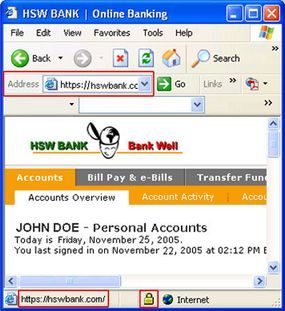

The landscape of social engineering has shifted. You no longer need a flashy, fake URL to steal data. The most dangerous attacks now happen inside legitimate browsers.
Consider the proxy computer. This device sits between you and the target website. It records every transaction you make. The site looks real. The address bar shows the correct domain. But the traffic is being mirrored.
Phishers who use these methods don’t have to disguise their links because the victim is at a legitimate Web site when the theft of their information takes place.
This is the trap. You trust the URL. You type your password. The proxy steals it.
Malware: The Hidden accomplice
Phishing isn’t just about emails. It’s about what runs on your machine. Attackers deploy malicious programs to do the heavy lifting.
- Key loggers capture every keystroke. Your password? Gone.
- Screen capture Trojans take snapshots of your activity. They report it back to the attacker.
- Remote access Trojans (RATs) turn your PC into a zombie. Your computer becomes a node in a botnet. It sends phishing emails or hosts fake pages.
- Bots chat with you. They mimic human behavior in forums. They coordinate the zombie networks.
- Spyware tracks your browsing habits. It learns your patterns. It helps attackers plan the next strike.
Your machine is compromised. The phisher doesn’t need to trick you into clicking a link. They just need you to visit a page.
Can you spot the difference?
How well do you actually know what you are looking at?
MailFrontier offers a phishing IQ test. It checks if you can spot fakes. Next Generation Security Software publishes a guide on other techniques. Antiphishing.org breaks down one attack step-by-step.
It’s a lot to track.
Anti-Phishing
Why basic security stops most scams
You already know the drill. Firewall on. Anti-virus active. These aren’t just buzzwords; they are your first line of defense against phishing. But if you want real safety, you have to look closer. Check the SSL certificate on any site before you log in. Scrutinize your bank statements line by line.
Phishers are sloppy. They leave fingerprints in their emails and websites. When you open your inbox, look for the red flags.
Generic greetings are a dead giveaway. “Dear Customer” screams scam. Legitimate banks usually take the time to type your actual name. (Note: Spear phishing is the exception. These attackers do their homework and use your name, so don’t let your guard down just because it feels personal.)
Watch out for threats. If an email says, “Reply in five days or we cancel your account,” delete it. Real businesses want your business. They don’t panic over a few days of silence.
No legitimate company asks for passwords or SSNs via email. This was true before phishing existed. It’s still true now.
Links are where the trap is set. Long URLs? Strange characters like the @ symbol in the middle? Typos? Don’t click. Type the address manually. It takes two seconds longer. It saves you from losing everything.
Misspellings are the oldest trick in the book. Poor grammar doesn’t look professional, and it shouldn’t be trusted in a financial message.
How governments and ISPs are fighting back
The war isn’t just on you. Businesses and governments are pushing back. The US government mandated that banks use two-factor authentication by the end of 2006. That means more than just a password. You need a physical token or a biometric scan. It’s a small hurdle that breaks the attack chain for most criminals.
Internet service providers and software developers offer toolbar protections. These tools verify security certificates instantly. They tell you where a site is registered. They analyze links before you click. Some even provide visual cues—a green bar or a specific logo—that confirm you’re on the real site.
Use them.
What to do when you get burned
If you think an email is fake, do not reply. Do not click. Do not give anything away.
Report it to the company being impersonated. Use their official website or call them directly. Do not use the contact info in the suspect email. You can also report the attempt to the National Fraud Information Center and the Anti-Phishing Working Group.
If you already gave them your data, the damage is done. But you can limit it.
- Contact the spoofed company immediately.
- Call your bank, lender, or credit card issuer.
- Report the fraud to at least one major credit bureau: Equifax, Experian, or TransUnion.
- File a report with your local police.
- Notify the Federal Trade Commission.
- Report the cybercrime to the FBI via the Internet Crime Complaint Center.
Change your passwords. Start with the compromised site. Then change them everywhere else. If you reuse passwords, you’re just waiting for the other shoe to drop.
The scale of the threat
Numbers don’t lie. In August 2005 alone, there were 13,776 phishing attacks linked to 5,259 different websites.
They targeted 84 businesses. But three companies took 80 percent of the hits.
85 percent of these attacks went after banks and financial institutions. The money is in the transactions.
Phishers succeed about five percent of the time. That’s not a high conversion rate, but in volume, it’s massive.
57 million US internet users received at least one phishing email. Up to 1.7 million actually gave their personal information away.
Source: NGS Software and AntiPhishing.org
Protecting your data from phishing attacks
Businesses have a role to play too. They need multifactor authentication. They need email authentication protocols. And they need to educate their users. You are the weakest link. Make yourself stronger.
If you suspect a phishing email, stop. Don’t click. Don’t provide info. Report it to the organization. Delete the message.
It’s simple. It’s boring. But it works.


