


It started three years ago.
The news hit hard. Drobo, the company that made my life simple, was going dark. If that name doesn’t spark a memory, that’s fair. Drobo made boxes of hard drives for people who hated computers. We just wanted our baby photos to exist. Forever.
My wife and I bought ours in 2009. USB 2.0 speeds. Firewire ports that became obsolete before we finished unpacking. No network connection. Just a USB cable and a prayer. For seventeen years? It never missed a beat. It sat under the desk. Silent. Stubborn. Alive.
Then Drobo left the building.
Suddenly, I was vulnerable. A gadget made in the Bush era, no longer supported by anyone. If one drive died? I could lose the last decade of family history.
I had to replace it.
I thought this would be easy. Wrong. I fell down a rabbit hole called “Home Servers.” And it is a dark, confusing place.
The Culture Shift
I went online looking for a simple backup drive. What I found was a subculture of people who hate the cloud.
Photographers? They talked about migration. Everyone else? They were building kingdoms.
They didn’t just store files. They ran 4K video servers for the neighborhood. Hosted Minecraft realms for kids in Ohio. Scrubbed Netflix content onto local drives. Used AI tools to tag terabytes of data automatically.
They talked about data sovereignty. A fancy way of saying “I don’t want Google or Amazon looking at my stuff.” They ripped CDs. Burned Blu-rays. Turned physical clutter into digital order.
The hardware itself had changed, too. My old Drobo was a dumb brick. The new NAS (Network Attached Storage) devices? They were tiny, hungry PCs. Low power, sure. But fast. Capable of transcoding video on the fly. Running virtual machines 24/7.
I didn’t want any of that. Not really.
But the momentum was undeniable. To store data today, you seem to need to become an IT guy.
RAMageddon Hits The Wallet
Timing is everything. And I had terrible timing.
Had I bought a device when Drobo folded in 2023? Easy. Cheap.
But I waited. I waited while RAM prices spiked. While silicon became gold. While the AI boom ate every hard drive manufacturer’s inventory.
On Reddit, people were complaining. High capacity drives? Gone. Used drives? Stolen or sold instantly. I watched forums light up with arguments. Synology fans defending outdated hardware. QNAP loyalists praising power. Asustor enthusiasts crying into their beer. And Ugreen, the new kid, rising on hype.
I needed drives. Not just any drives. Industrial-grade. Reliable.
Seagate IronWolf? Solid. Western Digital Red Plus? Quieter. I couldn’t have my server clicking away in the living room. It’s unsettling enough that I’m being watched by the fridge.
My old Drobo had four 4TB drives. With redundancy built in, I got 2.7TB usable space. I barely used a tenth of it.
Now? I needed to double that capacity. Understand RAID 1. RAID 5. RAID 6. Acronyms that decide if my data lives or dies when a spindle grinds to a halt.
I also worried about speed. 1 Gbps ports felt archaic. 2.5 Gbps? 10 Gbps? If I wanted to stream a 4K rip of The Godfather while my wife downloaded a photo backup, I needed bandwidth.
I looked for used gear on eBay. Desperation set in. Every listing was either too old to be useful or priced like a luxury item. The market was dead for the casual buyer.
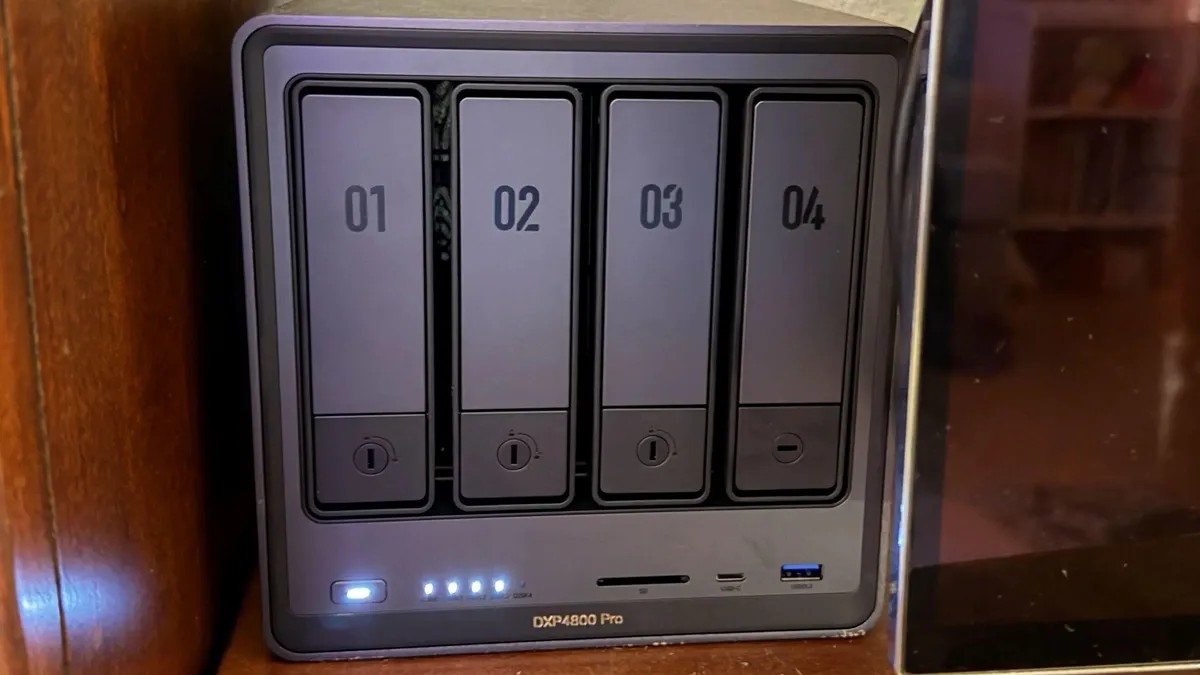
Finally, Amazon blinked. Ugreen DXP4800 on sale. Walmart had three WD Red Plus drives.
$700 for the box. $160 for each drive.
Ouch.
But I bought it. I told myself it’s an investment. In data security. In sanity.
Setup And Second Guessing
The box arrived. It looked like a toy. Sleek. Plastic. Cheap? Maybe. But I slid the drives in. Plugged in the router. Connected to the TV for setup.
Twenty minutes later, it was running.
I downloaded the Ugreen app. It found the device. No IP hunting. No command line prompts. Just a box saying Hello.
I created folders. Movies. Comics. Music. Family Photos.
Then the complications started.
Ugreen has an OS. It works. But what about Plex? The industry standard for media streaming? Ugreen didn’t support it natively. It wanted me to use Jellyfin. Open source. Free. But to run Jellyfin? I needed Docker.
Docker creates containers. Virtual spaces for software to live.
It’s great. If you like feeling like a system administrator at 11 PM on a Tuesday. I failed twice before I pointed the app to the right directory. When it worked? The interface was slick. Smooth. Addictive.
I hesitated to migrate my entire photo library. Too scary. Too much work. Instead, I started new. Photos from last week’s Pokémon Go run. A comic series. Movies I’d ripped from DVD ten years ago and forgotten about.
The speed difference? Night and day. Moving files to my old Drobo took days. Drag and drop across a slow USB link.
My new NAS? Gigabit ethernet. Network switch I bought for fifty bucks. 2.5 Gigabit bandwidth.
Thousands of files? An hour.
One hour.
The Reality Check
Here’s the truth they don’t tell you.
Your NAS is not safe. Just because it’s in your house doesn’t mean it’s secure.
Exposing it to the internet? Dangerous. Reverse proxies? Complicated. Port forwarding? A liability waiting to happen. Hardcore users say keep it offline. Keep it local.
I got scared. So I bought a UPS.
Power outages are bad for servers. Spinning disks stopping mid-write? That’s data death. The UPS keeps it running until I can shut it down. Another $80 spent. Necessary insurance.
But I’m still stuck in the middle.
I haven’t set up accounts for my kids. They deserve access to those old videos. They deserve to see how weird their dad used to look in 2005.
I’m overwhelmed. Decision paralysis sets in fast.
Do I run an AI bot to organize files? No. Too risky. Too technical.
Do I use Jellyfin for external access? Maybe later. When I understand firewall rules better.
I learned a critical lesson though. One every owner preaches.
NAS is not a backup.
RAID protects against drive failure. It does not protect against fire. Theft. Floods. Stupid mistakes where you accidentally format the array.
You need the 3-2-1 rule. Three copies of data. Two different media types. One off-site.
My NAS is copy number two. Copy one is on my computer. Copy three? In the cloud. iDrive. Backblaze. Somewhere far away from my living room.
It’s messy. It’s expensive. It’s complicated.
But when I watch a video I uploaded to my private server, and know exactly where every pixel lives…
It feels like power.
Just a quiet, expensive, under-used power.