



Breathing is something we often do unconsciously. You inhale. you exhale. it happens automatically. But for those dealing with stress or looking to deepen their meditation practice, learning to master their rhythm can be a game changer. Enter PranaBreath: Meditation & Serenity. This is more than just a mindfulness app. This is a proprietary software solution designed to guide breathing through the calibrated cycles.
This app makes heavy use of pranayama techniques and Eastern traditions. Organize your breathing into a certain pattern (inhale, exhale, pause). These are not random. These are fine-tuned to help you learn calming techniques and understand how your body responds to different breathing rates. If you are new to this, the guided environment will help you stay focused. If you are an experienced meditator, it provides a structured approach to deepening your practice.
Customizing Your Breathwork Routine
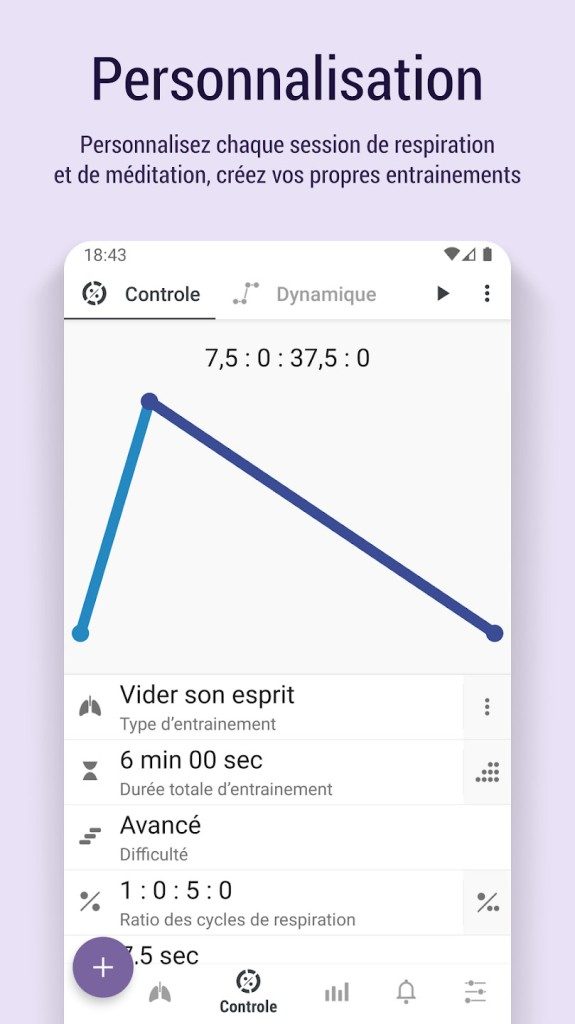
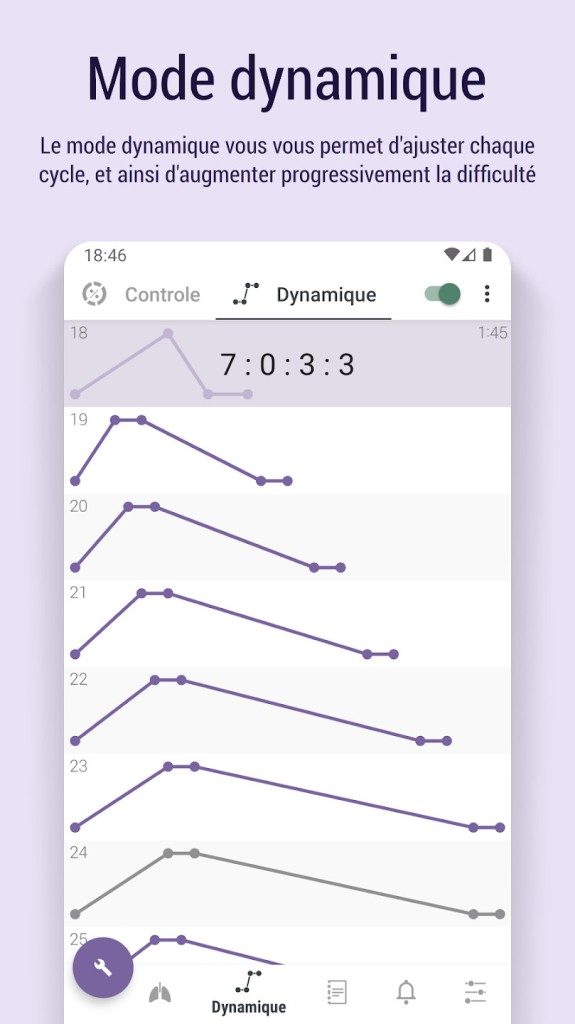
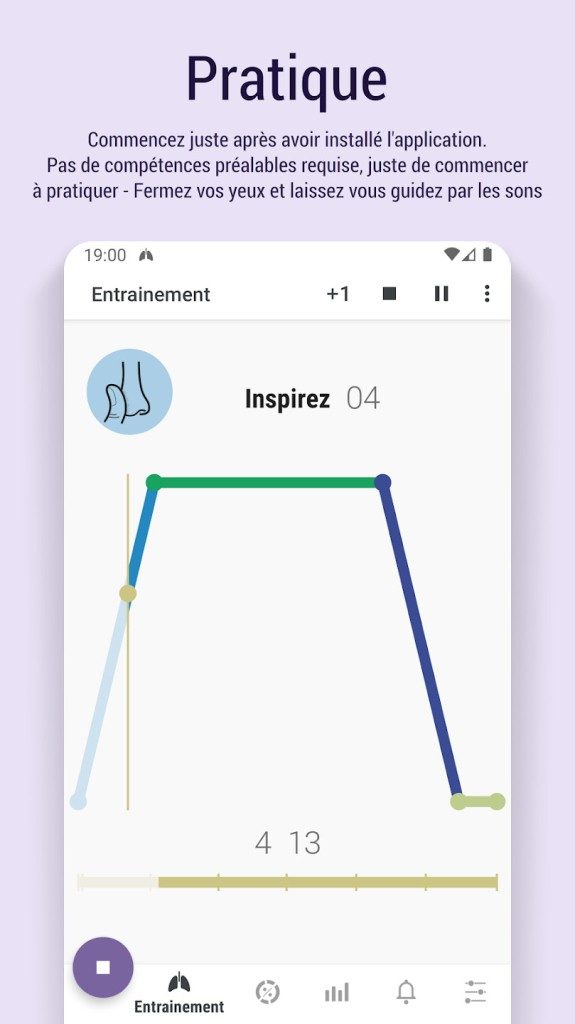
What makes PranaBreath better than common timer apps is its high degree of customizability. Don’t get stuck in a certain pattern. You can set the exact duration of each breathing phase. Want a long exhale to trigger relaxation? You can set it like this. Need a quick inhale to replenish your energy? Adjust. The app allows you to tweak these timings based on your personal needs and the recommendations of your healthcare professional.
In addition to manual adjustments, the application also offers preset programs. These have been handpicked with specific goals in mind.
* Anxiety management
Improve sleep
Improve lung capacity
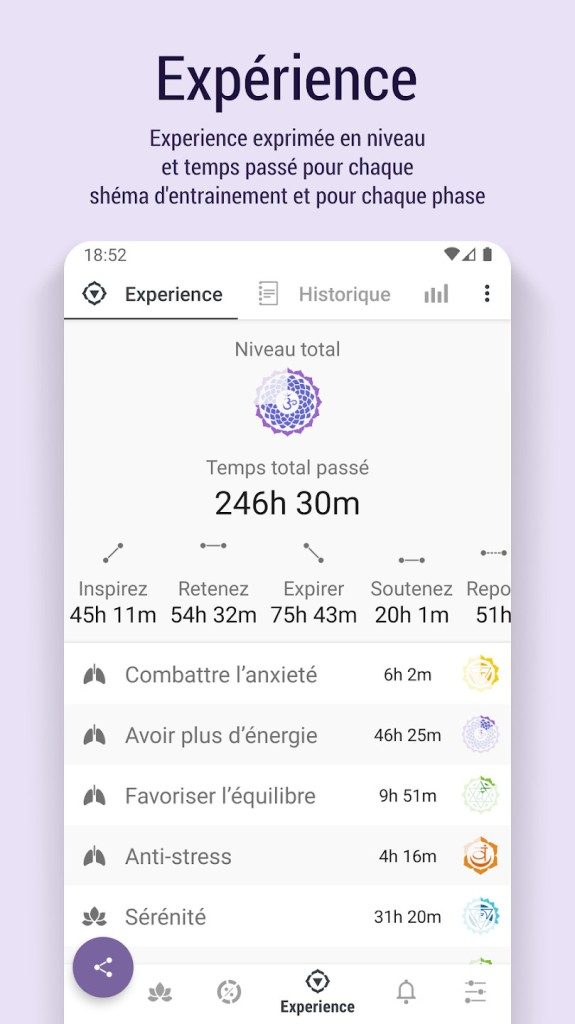
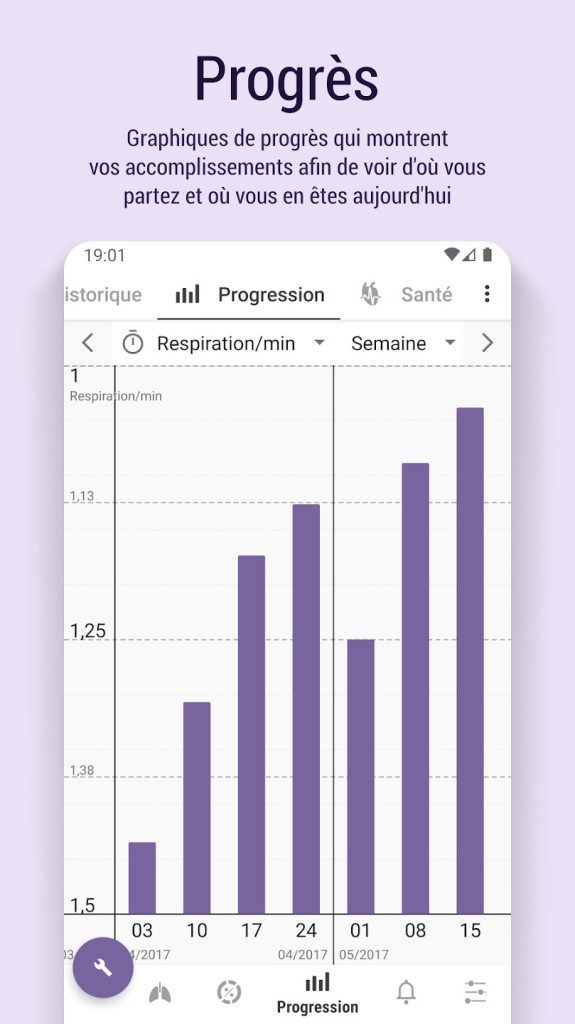
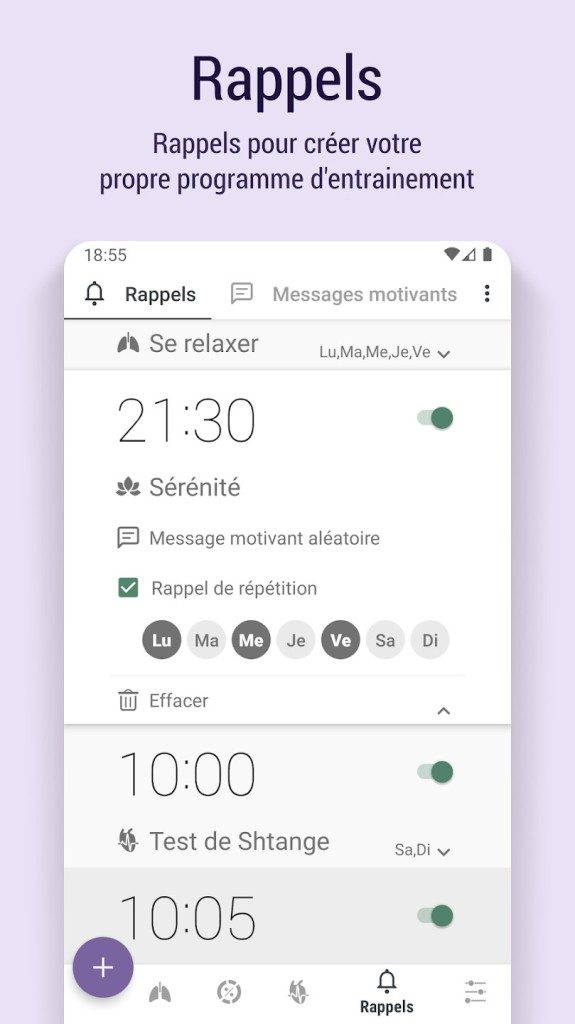
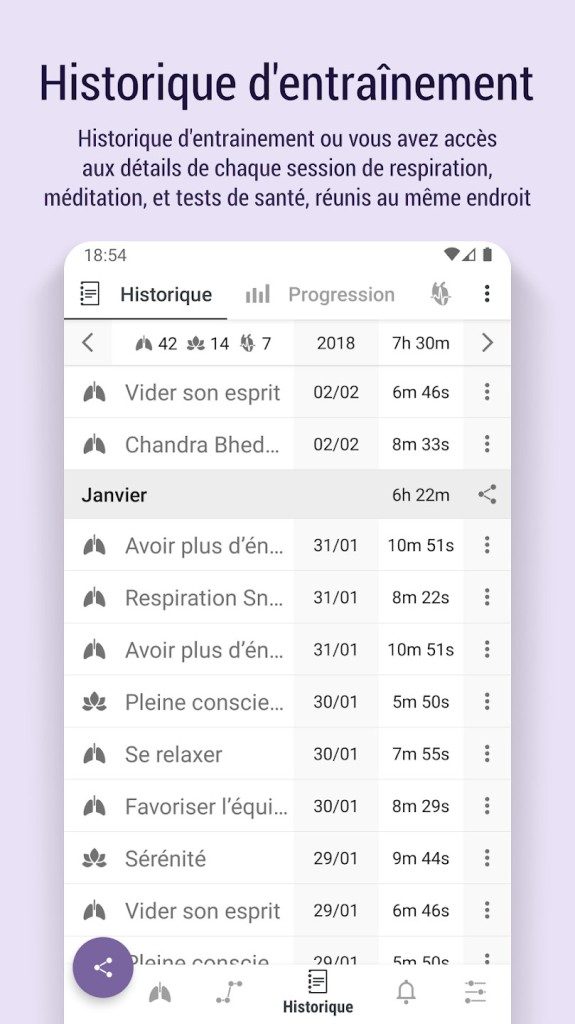
The user interface is simple, ergonomic and designed especially for Android touch screens. Privacy is respected and for many health conscious users this is non-negotiable. Your information will remain confidential while you track your progress. The included stats dashboard gives you a quick overview of consistency. Visualizing your data reinforces this habit and helps you stay on track. The reminders are subtle enough that you can create a routine without feeling an intrusive notification.
How to install PranaBreath on Android
Getting started is very easy. If you have an Android device, you can download the app from the Google Play Store. No more searching for obscure APKs or sideload files. Search for “PranaBreath: Meditation & Serenity”. The download and installation process follows standard Google Play protocols: tap, wait, and go.
System requirements are moderate. The application supports Android 4.0 and higher. Most modern smartphones and tablets operate well above this threshold, so hardware compatibility is rarely an issue. Updates are automatically pushed through the Play Store, ensuring you get the latest features and security fixes. If you prefer manual control, visit the app’s store page and click Update when prompted.
Compatibility issues for iPhone and PC users
This is the problem. PranaBreath is an Android app only. If you’re an iPhone user, you are out of luck for now. There is no iOS version. Windows, macOS, and Linux users also cannot download the native client. The developer has not yet released a desktop OS version.
This leaves Apple and desktop users with limited options. You can try the Android emulator on your computer. It works, but it’s not user-friendly. It requires technical knowledge and can feel clumsy compared to the native app experience. For most casual users, this is a dead end. It is better to look for alternative breathing applications that support the use of different platforms.
For Android users, security is easy. Continue using Play Store. Avoid third-party websites that offer “modded” or outdated versions. These unverified sources may pose security risks to your device and personal information. If you need to revert to an old version for compatibility reasons, download it from a trusted and verified source. The digital health industry is crowded, so using official channels can help keep your data safe while you focus on breathing.
Why breathing is important now
We live in a stressful world. Notifications, emails and constant connection keep our nervous system alert. Breathing has a balancing effect. It is a simple tool for adjusting the autonomic nervous system. Consciously slowing down your breathing sends a safety signal to your brain. This lowers cortisol levels and reduces anxiety.
PranaBreath makes this process easier by taking the guesswork out of it. The app provides structure instead of wondering if you’re doing it right. It helps to form habits. Habits change how you deal with daily stress. Over time, this habit can improve sleep and concentration. Although it is not a panacea, it is a strong supporter of a healthy lifestyle.
The app respects your time and privacy. You don’t need constant attention. It nudges you gently. In an age of digital overload, that restraint is refreshing. You engage when you need to, put the phone down and breathe.
Whether you’re looking to improve your sleep hygiene or simply find peaceful moments in a chaotic day, PranaBreath offers a structured path. Works best on Android devices. iPhone users will have to wait or look elsewhere. But for those who have access to it, the benefits of continuous guided breathing are clear. It’s not a question of whether you have time or not. The question is whether you can avoid trying.
You don’t need a credit card or subscription to start PranaBreath: Meditation & Serenity. The app is free to download directly from the Google Play Store, and unlike many competitors who hide their best content behind a paywall after a three-day trial, this basic version stays open forever. There is no countdown timer. Get instant access to core tools for learning and practicing meditative breathing techniques. Regardless of your financial situation, you can achieve respiratory health with this approach.
If you want to go even further, the premium version is available as a one-time in-app purchase. This enables personalized sessions, advanced statistics tracking and priority support for updates. The pricing model is incredibly transparent. There are no deceptive recurring charges or hidden subscription fees. License costs are reasonable, usually only a few euros higher than the basic price. This makes PranaBreath one of the most affordable health and wellness tools on mobile platforms.
Who is this app for? And does it offer certification?
There are no special licenses here for students or professionals. Developers have not yet created separate tiers for academic or corporate wellness programs. However, the flexibility of the user interface and the depth of the analysis tools make it surprisingly suitable for both groups. There is a gentle entrance for beginners. Experts get data.
A common question for those looking to use an app in a clinical or educational setting is whether the app offers certified training modules. Currently, the answer is no. There is no official certificate for the use of PranaBreath. However, the learning curve is gradual. The user interface is intuitive and the built-in guide is detailed enough that you rarely need outside help.
However, the community can fill in the gaps. Users on social media, specialized forums and review platforms continue to share tips that are not covered in the official documentation. It’s a living resource, kept alive by people who actually use it. The developers are committed to keeping the free version alive and ensuring that guided breathing exercises continue to be democratized in the long term.
When should I choose PranaBreath over competing products?
The success of the application is based on specific physical and mental health needs. It can be used as an independent meditation aid or as an aid for relaxation therapy and stress management. For novices, it’s approachable. Powerful analysis tools are provided for experienced users.
Who would benefit the most? People prone to anxiety find rhythmic breathing exercises particularly calming. Athletes use it to optimize recovery. Voice professionals who rely heavily on breath control will appreciate this precision. If you want to master breathing techniques, this app will give you a solid foundation.
How does it fare against its competitors? Apps like Breathe and Breathwrk dominate the market, but they cast a wider net. PranaBreath is unique in that it focuses almost entirely on pranayama. You can customize your breathing cycle more deeply than many competitors. If you want general mindfulness tools like sleep stories and guided podcasts, other apps may be a better fit. Some competitors specialize in sleep routines or included ambient soundscapes not found in PranaBreath.
But if you want to specific respiratory training, PranaBreath is the way to focus. You can also customize the program, track performance trends and export data. This is not only useful for personal growth, but also for coaches and trainers who want to track progress.
Why regular updates are important
One of PranaBreath’s strongest claims is its development rhythm. The team releases updates frequently, often incorporating suggestions from the community. This responsiveness creates a feedback loop that improves the user experience over time.
Whether you’re trying meditation for the first time or refining advanced conscious breathing techniques, this app provides a solid foundation for your progress. You can proceed at your own pace, either alone or with guidance. The lack of official certification does not diminish its usefulness. In a landscape of subscription fatigue, our one-time payment model and commitment to the free tier offer a rare level of reliability.
Is it perfect? Probably not. It lacks the holistic features of larger apps like Calm and Headspace. But if you are really interested in how the breath works, cuts through the noise. For example, the data export function allows you to take your progress elsewhere, giving you control over your own wellness metrics. This kind of autonomy is increasingly difficult to find.
This app does not promise to improve your life. It just gives you the tools to breathe better. For many, this is enough.
PranaBreath system requirements and offline functionality
You don’t need high-end equipment to run PranaBreath : Méditation & Sérénité. The developers created this app with wide compatibility in mind. This means it runs smoothly on most modern Android smartphones and tablets. There are no strict hardware requirements. If your device has a touchscreen, you’ll probably be fine with it.
The architecture prioritizes local processing. This is a key factor for users concerned about privacy and data limits. All training data remains on your device. By default, it does not sync to the a cloud server. You can export your progress if your app settings allow it, but the core mechanics are independent. This design choice supports for a true offline experience.
Connectivity is only required: downloading updates and making in-app purchases. You can practice breathing exercises anywhere. No Wi-Fi signal is required. This makes this app suitable for traveling, commuting on the subway, or simply avoiding screen glare in a dark environment. This interface works on both phones and tablets, so you can keep the visual cues of your breathing cycle clear regardless of screen real estate.
Pricing and Access Models
The application follows the usual freemium model distributed through the Google Play Store. The basic version is free and includes a powerful set of guided breathing exercises and pranayama techniques. This is not a bare bones demo. You can start training right away without a paywall.
Premium features can be unlocked with in-app purchases. These are one-time or subscription-based options and are managed directly through the Play Store. By separating the core functionality from the premium tier, users can test their workflow before committing financially. For many people, the free tier is sufficient for daily routine building.
Technical Specifications Breakdown
Here is the concrete data you need for compatibility checks.
Developer: PranaBreath development team
Category: Health & Wellness, Meditation
Operating system: Android (smartphones and tablets)
License type: Free with Premium In-App Purchases
Internet Requirement: None for exercises. Only required for updates and purchases.
Data storage: Local storage on device. Export options vary depending on your configuration.
Accessibility Features: Visual indicators, audio cues and tactile vibration feedback to guide breath rhythm.
Target audience: Beginners learn the structure and experienced practitioners hone their techniques.
Languages: Multilingual user interface depending on the system settings of your device.
Why Local Storage Matters
Applications that choose to store data locally are increasingly doing so intentionally. It reduces the attack surface for data breaches. It also eliminates latency. Your breathing cues are not buffered by a server load. These are triggered by the device’s own sensors and processors. This creates a more immediate, responsive experience.
The combination of offline functionality and local storage makes it a reliable tool for achieving consistency. You don’t have to rely on the stability of the web to maintain your mental health habits. This app is designed for everyday use and requires no installation or connection to fill in the gaps of your busy day. This is a pragmatic approach to digital health.
This request cannot be completed because no source article was provided.
Paste the text or URL of the article you want to rewrite. Create extensions according to specific SEO and style guidelines.