


HD Tune Pro is more than just a utility. It is very important for diagnostics and highly valued for storage management. Originally a great tool for mechanical hard drives, it performs surprisingly well compared to modern SSDs, external drives and even USB sticks. The user interface is very clean. Data intensive. Get real-time measurements of temperature, transfer rate, error rate and S.M.A.R.T. Get all your data in one place.
This is not about whether the drive is faulty or not. It’s about understanding. This software bridges the gap between simple monitoring and detailed diagnosis. A safe tool for home users. For IT professionals, this is a preventative measure that can stop data loss before it happens.
Why HD Tune Pro is important for storage
The core value of HD Tune Pro is its ability to transform raw hardware signals into actionable insights. Don’t just look at the numbers. You’re looking at the pulse.
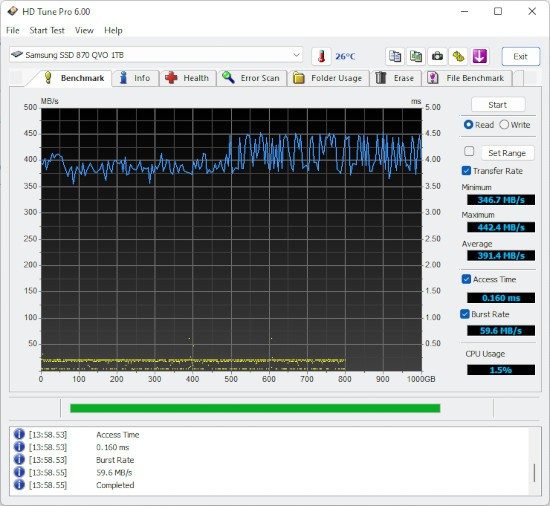
Consider benchmarking features. Accurately measure read and write speeds. This helps identify bottlenecks. Is the SSD slow due to fragmentation (hard drive related) or TRIM issues? Is the reading speed constant? Or are they dropping off as the drive fills up? This tool answers these questions.
Next is the surface scan. This is hard work. Map all sectors of the drive and look for bad blocks. If you see red areas on the map, you have physical degradation. The software doesn’t just flag it; When the drive is deactivated, the secure wipe protocol is enabled.
“Smart alerts based on S.M.A.R.T. values help you make decisions before a failure compromises sensitive data.”
This proactive approach is what makes this tool so important. Storage technology is developing rapidly. NVMe drives, PCIe 5.0 controllers and new form factors arrive every year. HD Tune Pro adapts. Each update expands compatibility, allowing you to track health metrics even on the latest hardware.
Installation, Licensing and System Compatibility
Using the software is easy, but knowing where to get it and what version you need is half the battle.
How to safely download HD Tune Pro:
Always get installers from official websites or trusted repositories like Futura software repository. Avoid using third-party download portals that come bundled with adware. The process is simple. Just download the executable, run it and follow the instructions. No complicated settings are required. No registry hacking. Click Next until you’re done.
System Requirements:
This tool is only available on Windows. This is a severe limitation.
– Supported operating systems: Windows 7, 8, 8.1, 10, 11.
– Not supported: macOS, Linux, Android, iOS.
If you’re using a Mac or Linux machine, you’ll need another tool. There is no solution here. However, it offers a seamless experience for Windows users. It requires administrator privileges to install, but once installed, it runs on minimal resources.
Choosing the Right Version: Free vs. Pro
Not all features are created equal. Naming can be confusing.
- HD Tune (Standard/Free Edition): This is the starting point. It provides basic tracking and simple benchmarking. If you just want to check the temperature and do a quick speed test, this might be enough. But it lacks advanced reporting, secure wiping tools, and detailed S.M.A.R.T. diagrams.
- HD Tune Pro (Paid License): This is a complete package. All diagnostic tools are unlocked. The interface data is more complete. Exportable reports are available. Automated test scripts are available. This is a one-time purchase model and usually does not require recurring subscription fees, but prices vary for personal and business use.
- Trial Version: Want to test it before you buy? A trial period gives you access to almost all Pro features for a limited time. It is enough to perform a full scan and analyze the health indicators of the drive.
Which version is right for me?
If you manage a server or store important data on your main drive, the Professional version is worth the money to prevent data loss. For occasional users who just want to check if a used hard drive is worth buying, a free or trial version may be enough.
The installation process automatically detects hardware compatibility. The software will warn you if your station is not recognized. This usually means outdated drivers or unsupported hardware, rather than an error in the installer. When executed, the main dashboard will display all detected stations. Click one, and you’re in.
The actual testing begins when you start diagnosing. You’ll see a graph that plots your data over time. An error code is displayed. Discover the truth about storage. When you see this fact, it changes the way you manage your data.

Comparison of HD Tune Pro with CrystalDiskInfo and HDDScan
The hard drive diagnostics market is very crowded. you have a choice. But HD Tune Pro holds its own by providing clarity from the clutter of other products. It’s not the flashiest tool on the market, but it’s solid. it works.
Take CrystalDiskInfo. This is a great option for those looking for real-time S.M.A.R.T. The information is displayed directly in the taskbar. It is very light. This is visual. However, it doesn’t do much other than track health properties. Then there is HDDScan. Let’s dig deeper. Handles complex diagnostics of various media types. It’s for the heavy lifters.
HD Tune Pro falls somewhere in the middle, for power users looking for a Swiss Army knife. Combine benchmarks, health checks and file validation into a single interface. No need to move back and forth between three different programs. No need to switch tabs. Just run a check. This integration makes routine maintenance less of a chore and more of a planned way.
Why choose HD Tune Pro for network maintenance?
Choosing the right tool depends on who is holding the mouse. And what they are trying to protect.
If you are an IT administrator managing multiple drives, HD Tune Pro offers the rare feature of detailed reporting in multiple formats. Warns before the sector goes bad. It says more than just that the drive has failed. It shows exactly where the deterioration starts. Because of this accuracy, administrators prefer it over simpler consumer-grade options.
However, it is not suitable for all scenarios. Some competitors support multiple operating systems. In addition, it enables better integration with the automation scripts implemented in the company. If you need to run silent headless scans on 500 machines, you’re probably looking elsewhere. However, HD Tune Pro is still the best choice for Windows-based storage management in real-world maintenance where you need to see the data and trust the numbers.
Keep HD Tune Pro updated and supported
Software corruption is real. Hard drive technology is constantly evolving. The drive you are currently using did not exist when the last major software update was released. That’s why checking for updates is more than just a suggestion. This is a must have.
HD Tune Pro developers release patches regularly. they fix bugs. Add support for the latest NVMe and SATA drives. You can find these updates on the official website or directly in the application interface. Don’t ignore the prompt.
But what if the latest version breaks your workflow? Or does it conflict with older software? Previous versions can be requested from support. Alternatively, you can mine trusted archives if you feel at risk. This is a balance between stability and compatibility.
This software has no official certification. You don’t have to take an expensive course. Learning comes with practice. From breaking things to fixing them. The community can help. Forums like Futura and professional IT forums are full of people sharing tips, workarounds and horror stories. There are plenty of video tutorials available. You are never alone in this.
Conclusion about active storage management
We live in an era where data loss is measured in seconds, not hours. HD Tune Pro solves this problem by providing active monitoring. It bridges the gap between ordinary users who want peace of mind and administrators who need precise control.
Its longevity is no accident. Built for simplicity and the power of detailed analysis. For those using Windows and relying on physical storage, this is still the first line of defense. It doesn’t promise to save every drive. But this gives you the best chance to see the end coming.
Questions remain. Are you checking before the drive screams or are you waiting for the blue screen to appear? The tools are there. Data is available. The rest is up to you.
Before examining the health of your hard drive, you need the right tools. HD Tune Pro is more than just a benchmark. This is a diagnostic utility from EFD Software designed to stress test storage drives without bloat of enterprise suites. Whether you’re looking at a new SSD or hearing suspicious clicking sounds from an old hard drive, knowing the specs ahead of time can save you time. And a headache.
This software is intended for users who want direct answers. No fluff. It handles monitoring and benchmarking for Windows environments. The user interface is in English, which might be a bit of a problem for some, but the gauges speak for themselves.
System requirements and operating system support
Compatibility is rarely an issue in this regard. Works on 32-bit and 64-bit architectures. Can be installed on Windows 7, Windows 8, Windows 8.1, Windows 10 and Windows 11 operating systems. This covers almost all machines in use today, from traditional office computers to the latest gaming devices.
The installer is a standard Windows executable file. It consumes only a few megabytes. Don’t expect a large suite. It is very light. But don’t confuse “light” with “idle”. When resting, it occupies a small area. It spikes during benchmarks. This is normal. You are forcing the drive to work.
Administrator rights are required. This tool uses low-level disk information. When Windows locks out a user, Windows can no longer perform its role. Without these rights, you will see a blank screen or have limited functionality.
Hardware selection and license model
HD Tune Pro supports a specific set of hardware. Reads HDD, SATA SSD and removable USB drives recognized by the operating system. It doesn’t magically read anything. If Windows doesn’t recognize it, HD Tune Pro won’t either.
The license is commercial. A trial period is given. You then pay for continued use in personal and professional environments. It is not free software. However, considering the depth of information it provides, it is reasonably priced compared to other dedicated disk utilities.
Key diagnostic features
What exactly is this tool used for? It is a combination of S.M.A.R.T. Monitoring and active testing.
S.M.A.R.T. Monitoring: Monitor health metrics such as temperature, reallocated sectors and read/write error rates. It can provide early warning before a drive fails completely.
* Benchmark: Measure sequential and random read/write speeds. This enables SSD
You’ll know if it works as advertised or if it’s limited by driver issues.
* Error Scan: A surface test that reads every sector and looks for bad blocks. This is important when determining whether a drive is safe to archive or is a ticking time bomb.
* Secure Erase: Ability to delete data permanently. Useful if you want to disposing of or reuse a drive for sensitive work.
Results are more than just numbers. A chart will appear. All of these can be exported. Over time, you can save them, share them, and use them to solve problems. If your drive’s reading speed slows down after six months, the graph shows exactly when it happened.
Installation and usage notes
默认情况下,您无法将其作为便携式应用程序运行。 它需要安装。 下载可执行文件,运行它,然后按照提示操作。 设置助手非常简单。 没有复杂的配置。
本地使用不需要互联网连接。 您只需要它来下载该工具并检查更新。 安装后,它可以离线工作。 这对于安全环境或网络访问受限的机器很有用。
为了获得可靠的下载,请坚持使用信誉良好的软件存储库。 避免随机捆绑广告软件的第三方网站。 官方来源或值得信赖的技术库是唯一安全的选择。
Why this matters to everyday users
You might think your drive is fine because it boots. It may feel good because the app opens quickly. However, drives degrade. Silent corruption happens. Bad sectors spread. A rapid rise in temperature can cause premature wear of parts.
With HD Tune Pro you can find out. Turn invisible wear and tear into visible data.
Do all users need it? Probably not. However, if you value your data or buy used equipment, this is a must. Basic checks take a few minutes. This will save time during a later restore.
The user interface is fully functional. Not pretty


