


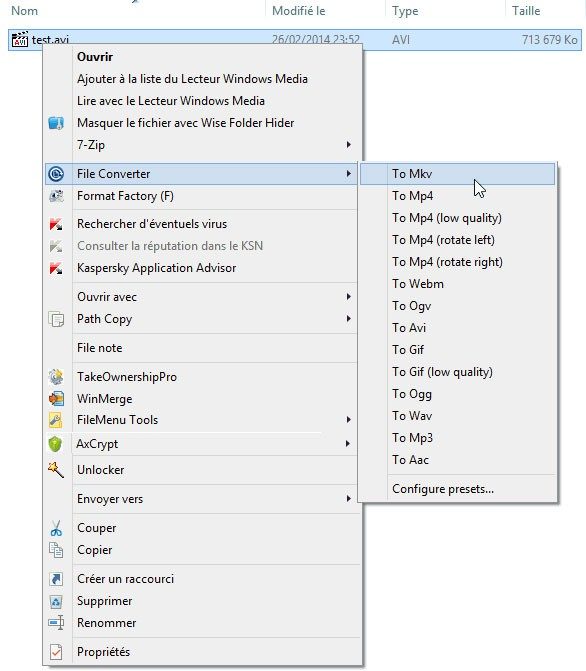
Most file conversion tools are bloated, slow or hide confusing interfaces. The file converter flips that script. It is a lightweight utility designed for Windows users who need to quickly switch between file formats without downloading large software packages or paying subscription fees. The real magic happens in the Windows Explorer context menu. You don’t even need to launch the app. Right-click on any file or set of files, select the desired output format from the menu, and let it work. This direct integration saves time for everyone, from the average user managing family photos to professionals handling large amounts of media.
Handle media and documents efficiently
This software supports various image, video and audio document formats. Want to batch convert a folder of JPEG images to PNG? Done. Do you want to compress your AVI videos to MP4 format, which is easy to manage on new devices? It handles that too. This tool is more than just a format switching. Provides adjustable parameters. You can adjust the resolution, compression quality and audio bitrate according to your needs.
The file converter stands out for its speed and low resource usage, so it can be used even on older devices.
Performance is a key differentiator. This tool works fast and consumes little system resources. This means that even if you have an older computer with limited RAM, you can run the conversion in the background without slowing down your computer. The interface is small and often invisible in normal use, but it offers advanced options if you want to automate your workflow or create custom conversion profiles. It adds to your system silently – no ads or bloatware, just a clean and functional addition to the right-click menu.
Installation and Windows compatibility
Getting started is very easy. The file converter is free. You can download it from a trusted source, run the installer and follow the instructions. The setup assistant allows you to select the file types you want to associated with the tool and specify the interface language you want. There is no need to register an account. There are no monthly fees. No subscriptions. It just works.
The catch? Only works on Windows. There are no native versions for MacOS, Linux, Android or iOS. If you’re in the Apple ecosystem, you’ll need to look elsewhere or use a virtualization solution. However, it offers a seamless experience for Windows users. It is integrated into the file manager of the operating system, so there is no need for complex configuration after installation.
Check the system architecture before downloading. The file converter is available in 32-bit and 64-bit versions to ensure compatibility with older and newer Windows computers. Supported operating systems include Windows 7, 8, 8.1, 10, and 11. If you’re having trouble with the latest update, or you’re stuck on a very old version of Windows that’s no longer supported by the latest version, you can download the previous versions directly. This flexibility ensures that the tools remain useful no matter how old your hardware is.
The ease of installation reflects the simplicity of the software itself. It respects your time and system integrity. You get what you need and that’s it. Such restraint is rare in a digital landscape filled with aggressive monetization strategies.

Most file converters try to meet everyone’s needs. These are packed with user interfaces, editors and visual effects that most people have never experienced. File converters are the opposite. It strips everything away. Our goal is not to be a creative series. Convert files without intrusion.
This approach creates a specific niche. If you need advanced video editing or complex visual filters, this is not for you. However, if you just want to batch convert images, audio and documents without a new interface, this is the best choice.
Comparison of File Converter with other tools
The world of conversion software is full. There are powerful tools like Format Factory and Freemake Video Converter. These tools offer comprehensive, versatile user interfaces. they are powerful. But they are also noisy. They need attention.
The file converter works in the background. It is integrated directly into the Windows right-click context menu. Select a file. Choose a format. It happens. You don’t need to launch another app or wait for the dashboard to load. It’s all about efficiency.
The trade-offs become clearer when considering cross-platform options. If you want to manage large image libraries across different operating systems, XnConvert is a good choice. It is sturdy. Handles batch processing very well. However, you need to understand this specific workflow.
Especially when it comes to video, HandBrake is the gold standard for macOS and Linux, and it also works on Windows. It’s incredibly powerful for compressing videos or changing codecs. But it’s not that simple. You need to adjust bit rate, encoder and filter. File converters take that away. Convert videos to MP4 in one click. HandBrake lets you plan your power. For most users, the latter is not necessary.
Is File Converter actually free?
是的。 情况一直如此。
与许多将其最佳功能锁定在付费墙后面的竞争对手不同,文件转换器不提供“专业版”或“学生版”。 没有高级级别。 每个用户都可以获得完整的工具,完全免费。 这不是过期的试用期。 这是整个包。
这种模式听起来可能不可持续,但它之所以有效,是因为该软件是轻量级的。 它不需要庞大的团队来维护复杂的云服务器或订阅计费系统。 开发是社区驱动的。 更新是定期的。 错误修复会在需要时推出。
支持来自社区。 有活跃的论坛。 有社交媒体团体。 文档很简单。 您不需要经过认证的支持工程师来解决这个问题。
Keeping the software secure and stable
Security is important even for free tools. We recommend regular updates. Do not corrupt the software on your hard drive. Check the latest version from official sources like Futura.
Updates are painless. Download the new executable. Run the installer. It replaces the old version automatically. Your settings? They stay. You don’t need to define the format you want again. In that sense, it is seamless.
But what if you hate change? That’s valid. In some cases, new versions can disrupt the workflow. Or certain old file types no longer work. File Converter doesn’t force you to upgrade. You can access older versions through the official website or trusted repositories like Futura.
This backward compatibility is very relevant for professionals. IT admins love it. They don’t want their users chasing the latest shiny feature because that brings instability. They want the tools that worked yesterday to work tomorrow. File converters respect this.
Do you need training to use it?
No, that’s the point.
There are no official certification courses. There are no introductory webinars. The user interface is very small, so it only takes a few minutes to learn the basics. However, if you need more detailed information, there are resources.
The tutorial is there. The guide covers advanced batch operations. The tutorial video explains how to convert links. These resources are useful for both casual and advanced users. Whether you want to convert a single PDF file or an entire folder of RAW photos, the community has probably already solved your problem.
Why it remains the go-to choice
文件转换器并不试图成为市场上功能最丰富的工具。 它试图成为最可靠的。 速度很快。 这是谨慎的。 它是免费的。
它填补了大型、臃肿的转换器所忽视的空白。 只想在没有学习曲线的情况下完成工作的用户。 它在家里工作。 它在办公室工作。 它可以处理日常的数字混乱,而不要求任何回报。
开发团队保持响应能力。 社区保持活跃。 而且该软件只是……有效。 现在就足够了。

File converter system requirements and specifications
You want to install a file converter, but first you need to know if it will slow down your computer or mess up your Windows environment. The good news: It’s designed to hide until you need it.
The software works locally. It doesn’t ping the server every time you convert an MP4 file. The actual conversion process does not require a fixed internet connection. This is important for privacy and speed. Run these files. Save these files.
Who created it and what is the license?
The developer is Tichau, aka Adrien Allard. He released it as free open source software under the GPL license. This is not just a “free trial”. There is a code. If you’re paranoid, audit it. If you have the skills, you can participate.
For the average user, this means no hidden telemetry to sell their data. This refers to the “pro” version, which allows you to unlock basic features without upselling. A simple and practical tool.
Windows compatibility: Will it work on my computer?
The file converter is targeted for the latest versions of Windows. If you are still using Windows 7, it will still work. If you’re using Windows 11, it’s for you. Supports 32-bit (x86) and 64-bit (x64) architectures. Such extensive support is rare these days. Most developers will drop 32-bit support after some time. Tichau doesn’t.
This integration is subtle. It adds itself to the Windows Explorer context menu. Right-click the file. Choose a file converter. Done. It doesn’t open a separate giant window for each task. It hooks into the OS shell. This will keep your desktop clean.
界面和语言选项
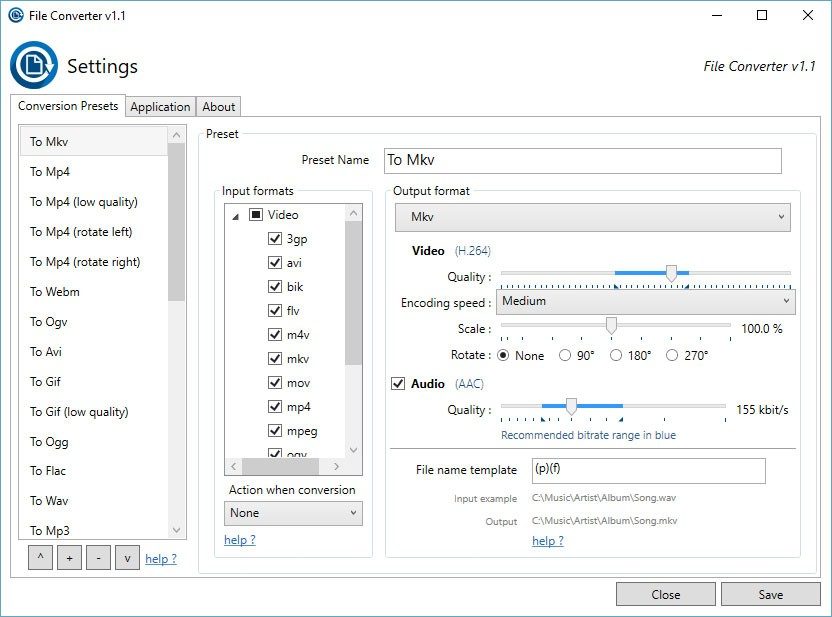
该界面是双语的,主要支持法语和英语。 通过社区贡献可以提供其他语言。 设置面板是神奇发生的地方。 您不只是点击“转换”。 您选择一个配置文件。
个人资料是关键。 您可以为音频比特率、视频分辨率或图像质量创建自定义设置。 需要缩小视频以发送电子邮件? One profile。 需要提取高质量音频进行编辑? Another profile。 批处理可让您对数十个文件进行排队。 您设置了配置文件。 你点击转换。 你去煮咖啡吧。
What formats can it handle?
The basics have been covered very well. audio, video and images.
- Audio: MP3, WAV, etc.
- Video: MP4 and standard formats.
- Image: PNG, JPEG, WEBP.
We’re not trying to be all things to all people. It doesn’t handle obscure RAW camera formats or proprietary corporate codecs. Meets the daily needs of 99% of users. If you’re a professional editor, you probably still use Adobe or DaVinci. But what about moving files, resizing for web and extracting sounds? It’s faster.
Installation and Prerequisites
The installer is a standard Windows software package. It is clean. There are no included toolbars. There are no “optional offers” and you have to uncheck five times. Download files from a trusted source like Futura to avoid file corruption.
Administrator rights are required for installation. Temporary files require some disk space during conversion. that’s it. There is no .NET Framework download. There is no Java runtime. It’s lean.
为什么这对日常用户很重要
大多数转换工具要么太复杂,要么太有限。 有些要求您将文件上传到云服务器,这对于敏感文档来说是一个安全风险。 其他的则有丑陋的界面和限制文件大小。
文件转换器位于中间。 这是本地的。 速度很快。 它尊重您的系统资源。 集成到上下文菜单意味着它成为您工作流程的一部分,而不是您必须寻找的单独应用程序。
对于专业人士来说,它使重复性任务工业化。 对于家庭用户来说,它消除了发送太大而无法通过电子邮件发送的视频的麻烦。
Safe place to download
Stick to official or highly trusted mirrors. The developer recommends downloading from Futura. This ensures that you get the genuine installers for both architectures. Avoid random download blogs. Often accompanied by adware.
Using and updating the software later requires a stable Internet connection. After that it can work offline.
Is it perfect? No tool is. However, a lightweight local conversion on Windows takes the guesswork out of it. Right-click. You choose. You wait. It’s that simple.

The source text for the first three parts is not shown in the prompt, so the article continuation cannot be created.
Paste the content of the previous section or the entire original article here. We will quickly rewrite it according to your style and SEO requirements.


